Tuesday, July 23, 2013

Shut down Windows 8 with 1 Click

Windows 8 came with nice look and well improved UI. Though it was especially designed for touch screen systems, it also works perfectly with mouse and other pointing devices.

How to shut down the system? This is the first experience most of you should have when you started to use Windows 8 because it doesn’t have the shut down button at its usual place. Then you have learnt how to do it though. By clicking the at the top-right corner of the desktop, you will get charms sidebar and go to settings > Power > shut down. [Win + C shortcut also brings the charms menu].
Nevertheless it needs 4 clicks or taps to turn off the PC. Alt + F4 also gives the quickest way to shut down.

Is it possible to shut down Windows 8 with just one click? Yes it’s possible. Let me explain how to do it. Here you don’t need to download any extension, software or codes.

1. First create a shortcut for shutdown process by right clicking on the Desktop and selecting New > Shortcut

 2. Type ‘Shutdown /s /t 0’ without quotes in the box provided (/s means shutdown the PC with a timeout of zero seconds (/t 0).  Then hit enter key and click ‘Finish’.


3. Now you will see a shortcut on the desktop. The double click of the shortcut will turn off the PC but this tutorial is extended till pinning the shortcut to metro tiles.


4. To change the icon of the shortcut, right click it and choose properties.


5. In the properties box, click ‘Change icon’ button and choose the regular icon for shutdown.


6. Now again right click the shortcut and choose ‘Pin to start’


Now you can shut down your pc with one click.


Friday, July 19, 2013

Customize Gmail background image with your own photo

Customizing the themes of Gmail is always fun. You can personalize your Gmail background with various themes provided by Gmail from istockphoto.com. It also allows you to create themes completely on your own.

A photo can be picked from your desktop PC, camera or picasa web. If you found a nice picture with good quality, copy its URL and paste it in the space provided. It reduces the time of downloading and uploading.

First let me explain how to use a photo from desktop PC. I suggest dark background pictures to give rich personalized look.

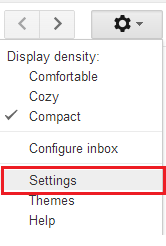
To get started, all the time you need go to Settings > Themes. Scroll down until you find ‘Custom Themes’. Now click ‘Light’ or ‘Dark’ which means the inbox color. There is no problem what you choose and you can change it next time. It will take you a fly menu which consists of the means to pick a photo.


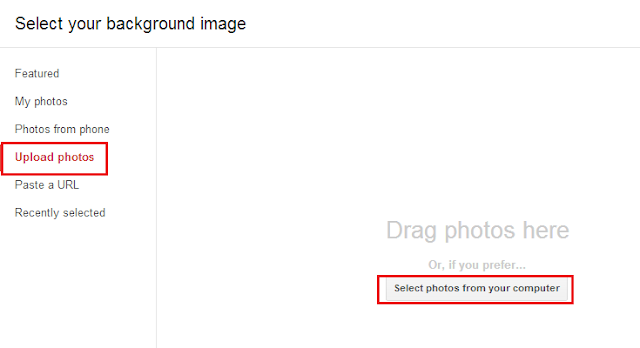
Choose ‘Upload Photos’ from left panel and then click ‘Select photos from computer’. That’s all.

Pick the photo from Picasa web.


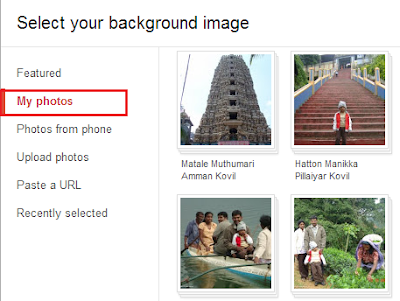
To choose a photo from picasa web album, click 'My Photos' which lists out your picasa web albums. Choose a photo from an album and click ‘Select’.


No wonder, click ‘Paste a URL’ to set a picture from another website.


Thursday, July 18, 2013

How to download a Youtube video without any software or Java

Youtube is a rich source for all kinds of videos. It is said that every minute, 100 hours of video is uploaded by Youtube users. One billion visitors hit the site every month. According to the Youtube policy, it doesn’t allow its viewers to download the videos. I think Youtube protects the uploaders rights.

However there are several ways to download a Youtube video. Many free softwares such as VDownloader, Youtube Downloader, Orbit downloader etc available on the internet. If you use Mozilla Firefox, numerous add-ons like 1 click Youtube Video downloader and ByTubeD, may help you to download the videos. Google chrome doesn’t have any Youtube downloader extension as Youtube is one of Google’s products. Previously Chrome accepted other website extensions. Now it changed the way. You can only attach an extension in the Chrome Web Store.

Some websites savetube.com, savemedia.com and voobys.com easily allow the users to download the video by pasting the URL. But the problem is, all the time you need Java plugin to download it.
In this blog, I’ll give an easiest way to download youtube video without any software, extensions or Java.

Go to the browser’s address bar while playing a Youtube video and add ‘ss’ just before the ‘youtube’ and after ‘.’ followed by www.

URL before:
https://www.youtube.com/watch?v=f9CWso66HCk
URL after:
https://www.ssyoutube.com/watch?v=f9CWso66HCk


Find the download links for various sizes and various formats. Click a download link and enjoy!
Keep in mind that some music videos cannot be downloaded due to a recent change in Youtube policy.

Wednesday, July 17, 2013

How to shut down Windows 7 faster

There is a massive improvement in Windows 7 start up with the new technology introduced by Aaron Dietrich of the Windows Client Performance team. However Microsoft Windows 7 has a slight drawback in optimizing shut down process. When my PC was fully loaded it was taking my time in minutes to shut down. I was terribly annoyed till I came to this solution. This method does not harm your operating system or hardware.

You need to do a small change in the registry file called ‘WaitToKillServiceTimeout’. Keep in mind, every change done in the registry affects the operating system. Therefore you are requested to follow the tutorial carefully.

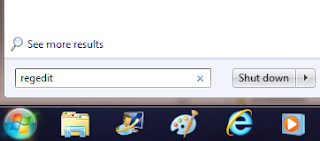
First type “regedit” into the search box and hit enter key. Registry editor window will appear. Now navigate the path given below:

HKEY_LOCAL_MACHINE\SYSTEM\CurrentControlSet\Control


Find ‘‘WaitToKillServiceTimeout’ in the folder and double click it. Under the value data, change the default value to 2000 (2 seconds) . In my case, default value is 12000. (12000 means 12 seconds) Click OK to save the setting.

After this setting I am able to shut down my PC within 15 seconds.

Tuesday, July 16, 2013

Top 10 Cool Android Apps for Sri Lankans

There are several Android apps for Sri Lankans on the Google playstore. Most of them are free. After a small study I have been able to list out some useful apps for all Sri Lankan. The number does not mean the rank.


1.    Lanka ID Card

 Sri Lanka Department of Registration of Persons issues National Identity Card (often called NIC) for every Sri Lanka who attains 16 years of age. After obtaining this card, he or she becomes an eligible one to vote and is identified as a Sri Lankan while seeking for various services. The NIC has a unique 10 digit number ending with ‘V’ or ‘X’. Anyone can guess some information from this number such as date of birth, sex, age etc.  The first 2 digits give the year of birth of a person and next 3 say on which day of the year he or she was born and whether the person is male or female.
Lanka ID Card app makes the things easier. Simply input the NIC number and tap ‘Get Details’ button, the screen gives some essential information of the cardholder. This app gives date of birth, age, the weekday of birth, gender and voting eligibility. [Download Link]


2.    Electricity Bill Sri Lanka


Electricity bill has turned into a big headache for all Sri Lankan. For few months it has been a serious talk between the citizens.  Several people have started to monitor their service meter and try to control the use of electrical equipments.
This cool app offers you an electricity cost calculator. This allows you to calculate monthly electricity bill for a given period of time.  It produces the results in 3 ways old tariff, proposed tariff 2013 and approved tariff 2013 according the Public Utilities Commission of Sri Lanka.
Select the category ‘Domestic’ or ‘Religious’ and give start date, end date and number of units consumed. Tap ‘Calculate’. [Download Link]


3.    Sri Lanka Train Schedule


This is an award winning app from which you can get the information of train schedule, train delays and ticket prices. This application is very useful for every Sri Lankan. Obviously most of the north people may not use this app until ‘Yarl Devi’ hits Jaffna station.
[Download Link]


4.    Sri Lanka Postal Codes

This simple application gives the postal code of every city in Sri Lanka and contact numbers of the post-office in the city.  It also allows you to search a city for a postal code. Postal code always helps to find exact place without any confusion.

[Download Link]


5.    Sinhala –Tamil - English Dictionary. 


With this nice app, find the meaning of an English word in Sinhala and Tamil. It supports for Android 1.5 and above. This dictionary has over 150,000 English words with spelling suggestions. No font installation is required.
You can use this dictionary as English to Sinhala or English to Tamil. The big advantage of this dictionary is that you can transliterate Sinhala to English or Tamil to English by the typing the Sinhala or Tamil words phonetically. For example, if you type ‘Ammaa’ it understands and transliterates as ‘mother’.
As this is an online dictionary, internet connection is required.
[Download Link]

 6.    Sri Lankan Recipe

This app delivers quick and easy to prepare recipes which can be made in your kitchen. All recipes have been made to taste in a western kitchen. Each recipe is explained with a nice picture.
All recipes have been classified into seven major categories Rice, Poultry, Beef, Seafood, Vegetarian, Sambol and other. Once you downloaded this app, you can refer the recipes offline too. No active internet connection is needed.
[Download Link]


7.    Sri Lanka Weather

This app gives 10 day weather forecast for major cities in Sri Lanka from current day. This application is quite different from other weather apps. The weather of the cities is shown on an interactive map of Sri Lanka. It lets you to changes the unit of the temperature C or F.
[Download Link]
 

8.    Sri Lanka Bus Fares.

Bus fares for major cities in Sri Lanka can be viewed with this application. Find the route number and bus fares by entering the starting location and ending location. It gives the normal rates, semi luxury rates as well as luxury rates.

[Download Link]


9.    Sri Lanka Heritage

Sri Lanka Heritage is a travel and tourism guide which shows the heritage and historical sites of Sri Lanka. It gives the information, map and nearby things for each heritage.  You can pick your place with Google map and find the nearest heritages, historical sites and hotels. But its full version allows you to find nearest ayurveda and spa, beach, bars pubs nightlife, hospital, shopping mall, wildlife and so on.
[Download Link]

10.    Sri Lanka mobile portal

This is very useful information for those who work in Government institutions and those who seek information regarding Government institutions and services.  It provides government mobile applications for Android, Government SMS (GovSM) services such as Postal Codes, NIC Application Status Tracking, Police Clearance Certificate Status Tracking and Train Schedule.
[Download Link]

Monday, July 15, 2013

Download Something without giving your Email ID

You are fascinated with a software or an ebook when coming across a website which offers it for free to download. But the problem is, the most of the websites do not provide download links unless your register yourself with your email address. The headache begins after the registration. You may receive spam mails.

If you are not contented a website which you have never heard about before, don’t give your private email address. If no, how can we download this software with a safe manner? Let me give some solutions to beat spam problem.

Solution 1: Go to BugMeNot website
www.bugmenot.com is a website which probably contains usernames and passwords for all such websites. You can use them to log in and download the software without any trouble. Every day many users, once they registered in such websites, provide the username and the password to BugMeNot.
Head to bugmenot.com, give the URL of the website from which you are going to download the software. It will list out some usernames and passwords. Choose an account detail which has high success rate and log in.


Solution 2: Use disposable email addresses
If the first solution is not successful, give a try with this solution which never fails. Use disposable email address for registration purpose. Disposable Email Address (DEA) is a temporary email address offered by a few websites for free and will be available for a few minutes or a few days. After then they will have self destructed. 10minutemail.com, getairmail.com and maildrop.cc are some DEA service providing websites. Here you are not going to give any personal information or anything. They only provide you a temporary email address. All you have to do is, copy the email address to clipboard (Don’t close the site). Then use this email address to register in those websites. Immediately the website will send you a confirmation mail. Now come to the disposable email website. It automatically checks every 10 seconds. You can find the confirmation mail in the inbox. Click the confirmation mail and login the website. Enjoy!


Friday, July 12, 2013

Record calls automatically in Android Phones

Normally the smartphones which runs on Android platform do not have call recording facilities, even if normal mobile phones have. Recorded calls may be helpful to you in so many ways. For instance, I have a habit of recording calls when I talk to a technician to sort out a technical problem. I use these recordings for my future reference.

There are numerous stunning applications available in Google playstore to record the calls. Auto Call Recorder is one of the best free call recorder records any phone calls automatically while calling. After calling, you are notified to choose which calls you want to save. This application also allows to save the recording into Dropbox or any other cloud drives.


Every recorded call is stored in the inbox which is a temporary storage normally saves 20 calls. You can increase the size up to 100. If you forget to save the calls into ‘Call Recordings’ folder in SD card, it may be deleted when new records fill the space in the inbox.

With this free version, every time you need to save the calls manually. If you purchase its Pro version, you will be able to set calls to save automatically for selected contacts.

The free version allows you to do 3 settings. Default mode is ‘Record everything’ which records all calls without any notification. ‘Contacts to record’ option lets you to choose which contacts' calls should be recorded. Third option records all the calls of the people who are not in the contacts.


Auto Call Recorder has the feature to record the calls in three audio formats AMR, 3gp and wav.


How to integrate with Dropbox


Head to settings. Under the cloud category, choose Dropbox. It will let you to sign up with Dropbox. All recorded calls are synchronized once you signed in with clouds and devices.